Online ordering for Indian takeaways and curry houses, on your own website

DingOrder is an online ordering system for UK Indian takeaways and curry houses, with no commission per order: each shop gets its own ordering website.

£59 a month, plus a one-off £199 for the kitchen printer and setup, refunded in full if your test order can't be made to print.

Link won't open inside WeChat? Tap "···" at the top right and choose "Open in browser", or save the number.

Customers choose chicken, lamb or prawn, the heat and their rice and bread on their phone, and every choice prints under the dish on your kitchen ticket.

You pay the £199 before I set you up. Your first monthly payment of £59 is taken 30 days after your test order prints. After that, Stripe takes £59 a month by card subscription. Your price is locked for 12 months from your first paid month. No minimum term: how stopping works. No commission per order; Stripe's card fee applies.
What DingOrder is

DingOrder (叮单) is an online ordering system for independent takeaways and small restaurants in the UK, with no commission per order. Each shop gets its own ordering website, on a web address ending in .web.app (for example yourshop.web.app) or its own domain. Customers order collection, delivery or eat-in (by scanning a QR code on the table) on an ordering page in English or Chinese, which opens in the language of the customer's phone, and each order prints automatically on the kitchen printer. Shops pay a one-off fee for the kitchen printer and setup, then a flat monthly fee; card payments are processed by Stripe, which charges its own card fees. DingOrder is run from London: shops in London are set up in person, and shops elsewhere in the UK remotely.

How a curry house menu is set up

A curry menu is mostly a few sauces cooked with different meats, at different prices. In DingOrder that stays one dish with choices, not a separate line for every combination:

On your menu How it works in DingOrder
Chicken, lamb, prawn or king prawn The dish's own choice, each with its own price. The customer picks one before the dish goes in the basket. A dish can have 2 to 6 of these.
Mild, medium, hot A "Choose 1" list at no charge, used on every curry that needs it.
Rice and naan with a curry An extras list with a price for each, such as pilau rice or a peshwari naan.
Set meals for one or two One dish with lists to choose from: for example 2 starters, 2 mains, 2 sides and a rice. A choice can add a surcharge, such as king prawn instead of chicken.
Sundries such as poppadoms or chutney Plain dishes, added in one tap, or an extras list on the set meal.

What DingOrder can't do yet on a curry menu

  • An extra costs the same whatever the customer chose first. A rice can't cost more with a king prawn dish than with a chicken one.
  • A choice can't open more choices. In a set meal, each list is answered on its own.
  • A set meal can't hold the same item twice, such as two of the same starter.
  • You can't mark one choice sold out for the night, such as king prawn. Remove it from the dish, or switch the whole dish off and on again.

What prints on the kitchen ticket

Each order prints by itself on your kitchen printer as soon as it's placed. Under each dish, the customer's choices print one per line:

Ticket line What it is
1x Tikka Masala The quantity and the dish, in large bold text
Lamb The meat the customer chose
+ Hot The heat
+ Pilau rice Each extra, one per line
£14.90 The price for the line, extras included

Extras don't print their own prices; the line price includes them. A reprint shows what the customer ordered, even if you've changed the menu since. The ticket also shows the order number, the time, collection or delivery, paid or unpaid, the customer's name and phone, the delivery address, each dish's confirmed allergens and the customer's note.

The admin and the kitchen tickets can be in English. You switch them between English and Chinese yourself, in the admin's shop settings. Dishes don't need a Chinese name, so your shop can run fully in English. Customers choose English or Chinese for themselves.

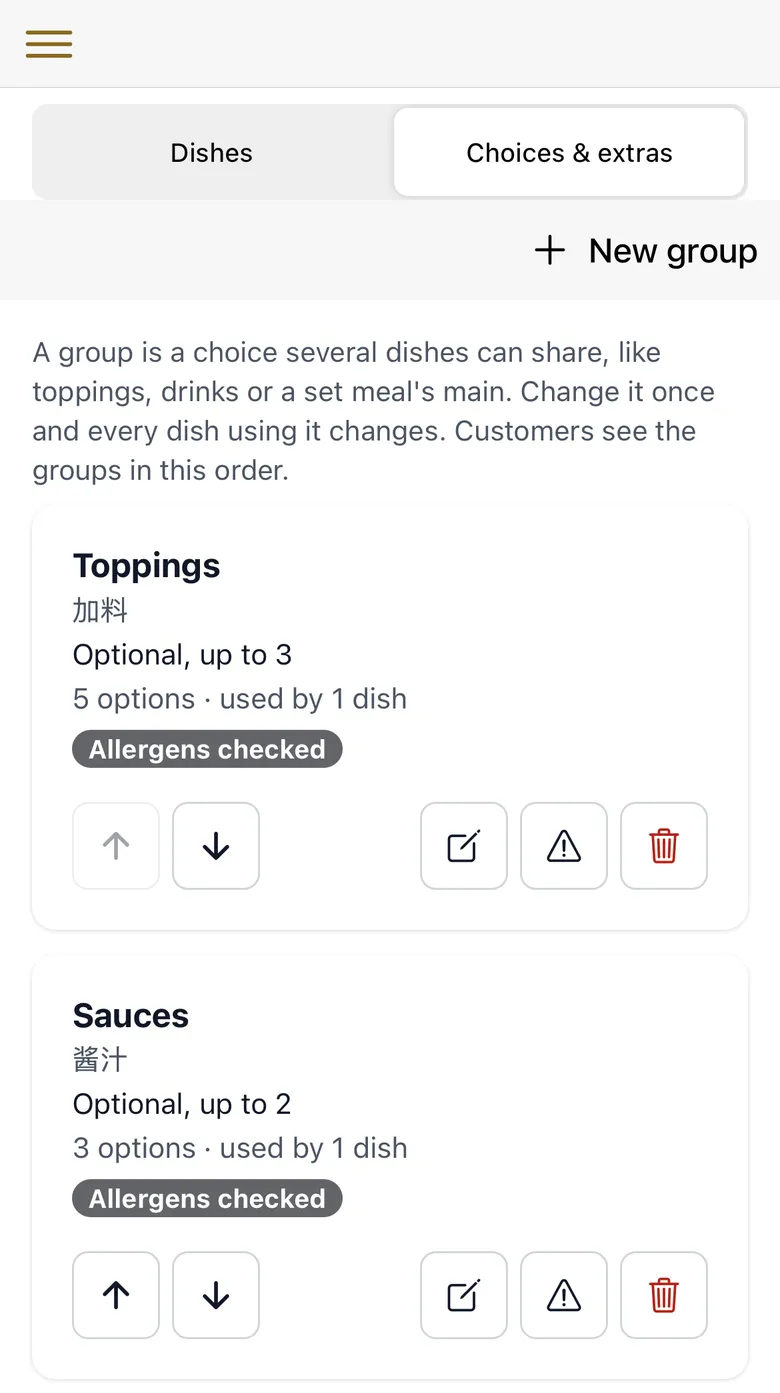
The Choices & extras page in the English admin: each list with its rule and allergen check (demo shop)
The Choices & extras page in the English admin: each list with its rule and allergen check (demo shop)Tap the picture to see it larger.

Support and a demo

Setup and support are in English or Mandarin. Sizes, extras and meal deals are new: they were added in October 2026. The English admin and English kitchen tickets were added in October 2026. Want to see it first? Message me and I'll show you on my phone what customers and the kitchen see in the DingOrder demo shop.

Allergens on a curry menu

Allergen tags only show on dishes you have checked and confirmed. When the basket has a dish you haven't checked, checkout asks customers with allergies to call you before ordering. A dish's confirmed allergens also print on the kitchen ticket.

A list of choices can carry allergens too. If your peshwari naan has nuts, confirm the allergens on the bread list, and customers see "Some choices contain: …" with the allergens you confirmed, while they choose. A list's allergens don't print on the kitchen ticket, so check the choices printed under each dish against your own records when you pack the order.

Checking each dish is your job; the system shows what you confirm. Customers can also write a note with the order, and the note prints on the ticket. What UK allergen rules ask of online takeaway orders.

Collection, delivery and eat-in

  • Collection. Customers give a name and a UK mobile number. Both print on the ticket.
  • Delivery on your rules. You set how far you deliver, the fee per mile, a cap on the fee and up to five minimum-order rules, such as "over 4 miles, minimum £30". Your own drivers deliver.
  • Eat-in by QR code. A QR code on each table opens the menu with the table number filled in, and the table number prints on the ticket. I give you a link for each table; you print the QR cards.
  • Card or cash. Card payments go through Stripe, which charges its own fee. Cash for collection and eat-in; cash on delivery is optional.

Everything DingOrder does.

How much DingOrder costs

£59 a month, locked for 12 months from your first paid month, plus a one-off £199 for your kitchen printer and setup, paid before setup and refunded in full if your test order can't be made to print. The first £59 is taken 30 days after your test order prints. From the second month, Stripe takes £59 from your card automatically each month, in advance (a card subscription). No minimum term.

A worked example: at a £20 order and 14% commission (Just Eat's rate when you deliver yourself is 14% + VAT on its partner page, checked 13 October 2026; this example leaves VAT out), each order that comes to you directly saves £2.80 of commission. Paid by card, Stripe's fee on it is 50p (1.5% + 20p on standard UK cards, Stripe's UK pricing, checked 13 October 2026), which leaves £2.30. £59 ÷ (£2.30 × 4.33 weeks a month) = 5.9, so £59 a month pays for itself at about 6 direct card orders a week. The one-off £199 isn't in this sum: at the same £2.30 an order, it takes about 87 direct card orders, once. Not every order will move to your website, and your numbers will differ. Full pricing and what's included, or work out what the apps cost you.

How setup works

You send me your menu (a photo of your printed menu is fine), we sign the agreement, and you pay the one-off £199. I enter your menu, and you check it. In London I connect the printer in person; elsewhere in the UK it's posted to you and I help you connect it by phone or video call. Then we place a test order together. I give you a date once I've seen your menu.

The kitchen printer is part of the one-off £199. It doesn't need a computer in the shop.

Send your menu as it is, with its meats, set meals and sides. I set up the choices with you, and you check every price before anything goes live.

DingOrder questions from Indian takeaways

Do I need a separate menu line for chicken, lamb and prawn?

No. One dish carries the choice, each with its own price, and the kitchen ticket says which one the customer picked.

Does everything work in English?

Yes. Switch the admin and the kitchen tickets to English in the admin's shop settings. Dishes don't need a Chinese name, so your shop can run fully in English. Customers can still switch the menu to Chinese if they want.

Do I have to come off Just Eat or the other apps?

No. Your DingOrder website gives regulars a direct way to order from you; the apps can carry on. Before you set your website's prices lower than on an app, check your contract with that app.

Send me your menu

Send me your menu and roughly how many orders a week come through the apps. A photo of your printed menu is fine. I'll tell you honestly whether DingOrder fits.

Link won't open inside WeChat? Tap "···" at the top right and choose "Open in browser", or save the number.

Last updated:

WhatsApp meCall me back